| Check | Observed result | Source |
|---|---|---|
| First-team signup credit | $5, applied automatically; no promo code required | Official source ↗ |
| Signup-credit window | Expires 90 days after signup | Official source ↗ |
| Signup-credit scope | Applies to all products except SaaS Add-Ons; cannot be transferred to another team | Official source ↗ |
| Separate Cloudways wording | The small-business hosting page says $100 in free credit within a Cloudways section and links its Try for free button to cloudways.com | Official source ↗ |
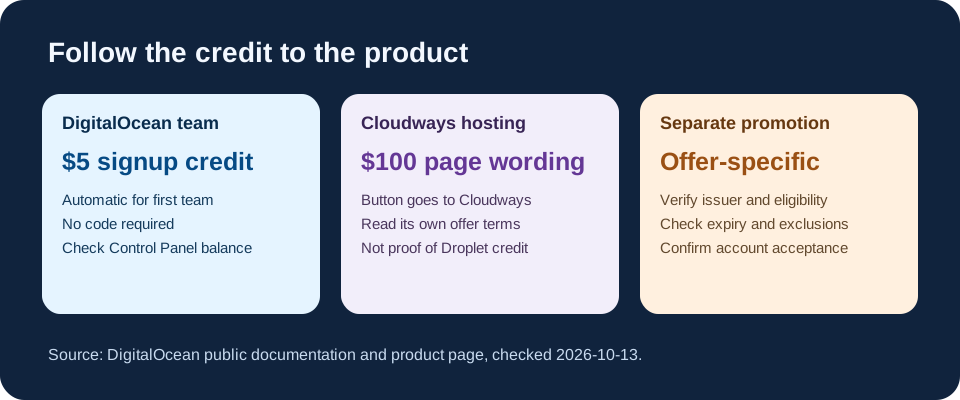
The three credit paths are not interchangeable
The first path is documented DigitalOcean signup credit for a new team. Its billing page says the credit is automatic, visible in the Control Panel's top navigation, and reduced as you pay for resources. The document does not ask you to collect a code from a coupon list.
The second path is the $100 wording on DigitalOcean's small-business website-hosting page. Read the paragraph around it: the page is describing Cloudways managed hosting, and its Try for free link goes to cloudways.com. That is evidence of a Cloudways-directed offer, not proof of a $100 balance in a DigitalOcean Droplet team. We did not open a Cloudways account or verify its checkout terms.
The third path is a separate promotional or referral offer issued to a particular visitor. DigitalOcean's promotional terms limit credits to designated services and any extra conditions in that offer. A search result promising a large balance cannot establish that your account qualifies or that the credit can be combined with the automatic signup credit.
Check the product before you register
Start at the provider's own page and read the offer in its surrounding product section. Record where the button actually goes: DigitalOcean's team registration and a Cloudways managed-hosting signup are different destinations. If the page only gives a headline and the button leads to another product, do not carry that headline over to a Droplet comparison.
For a DigitalOcean team, check the official signup-credit documentation and then the credit balance shown in the new team's Control Panel. For a Cloudways offer, inspect the current Cloudways signup and billing terms before treating the amount as usable; the DigitalOcean page alone did not give us those conditions. For a separately delivered promotion, keep the issuer's exact eligible service, expiry and redemption instructions.
What the automatic credit does and does not cover
DigitalOcean says its first-team credit applies to all products except SaaS Add-Ons. The same document says you must add a valid payment method before creating a Droplet or other resource, and you cannot transfer signup credit to another team. Its 90-day expiry is measured from signup, so a late first deployment does not restart the window.
A credit is a balance against eligible charges, not a permanently free server. DigitalOcean's promotional terms say charges above the available credit are billed, exclude certain services and taxes, and prevent combining promotional offers unless DigitalOcean authorizes it. Those terms are a reason to monitor the account's balance and actual invoices rather than counting a marketing headline as cash.
A practical account check
- Identify the product first: DigitalOcean team and Droplets, Cloudways managed hosting, or a specific partner promotion.
- Read the current provider page and follow the offer button. Save its product, eligibility, exclusions and expiry in your notes.
- For the documented team signup credit, look for the Signup Credit balance in the Control Panel; do not enter a random code to recreate it.
- Add a valid payment method only when you understand that usage beyond the available credit can be billed.
- Before the credit expires, inspect current resources, balance and billing history; delete resources you no longer want to pay for.
Questions readers ask
Do I need a code for the documented first-team credit? No. DigitalOcean's signup-credit page explicitly says no promo code is required for that automatic credit. A separate issued promotion may have a different redemption path.
Does the $100 Cloudways headline mean my Droplet team gets $100? The inspected small-business page does not establish that. Its surrounding section and destination link are for Cloudways managed hosting. Verify the specific product's current terms before signing up.
Can I move unused signup credit to a second team or stack another offer? The signup-credit page says the credit cannot be transferred between teams; DigitalOcean's promotional terms do not allow combining offers unless the provider authorizes it. We did not test an account-specific exception.
Sources and checking method
On October 13, 2026, we used the system Chrome extension to read DigitalOcean's signup-credit documentation, its small-business hosting page and its promotional credit terms. We compared the product named near each credit claim with the offer button's destination and the published restrictions. Google US results and People also ask supplied reader-question clues, not credit evidence. We did not create an account, redeem a code or verify a Cloudways checkout. This guide contains no affiliate link.